

Table of Contents
- Yes, You Can Walk While Typing, Here's What to Expect
- Benefits of Walking While Working at Your Desk
- Treadmill Desk Setup Tips That Actually Make a Difference
- Best Laptop Stands for Treadmill Desks
- Mouse Precision and Cursor Control While Walking
- Common Challenges When You Walk While Typing (And How to Fix Them)
- Conclusion
Last Updated: August 12, 2026
Yes, You Can Walk While Typing, Here's What to Expect
You can walk while typing on a laptop, and millions of remote workers do it daily without sacrificing accuracy or focus. The setup requires a short adjustment period and the right ergonomic configuration, but once dialed in, most people type nearly as well at a slow walking pace as they do sitting.
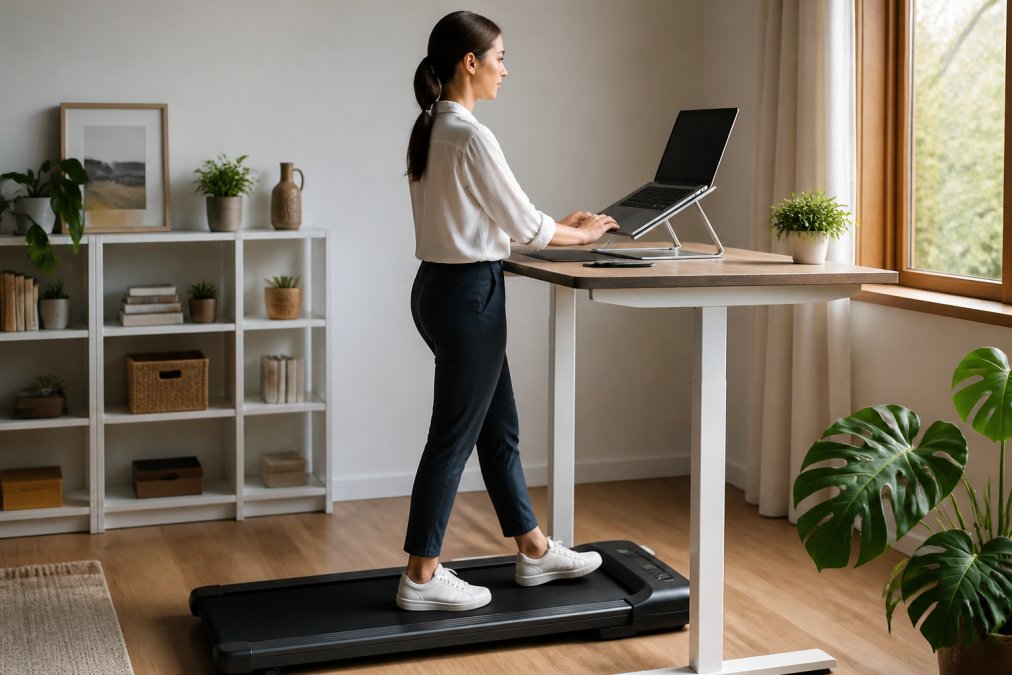
The first few sessions feel awkward, your hands want to grip something, your eyes take longer to focus on the screen, and your typing speed will drop. That's biomechanics recalibrating for a moving baseline.
The Learning Curve Is Real but Short
Most people reach comfortable typing accuracy within three to five sessions. Walking at 1 to 2 miles per hour minimizes gait disruption and keeps your upper body stable. Faster speeds noticeably harm coordination. A common mistake is starting too fast, slow down more than you think necessary. The goal is sustained, low-impact movement, not a workout.
Which Tasks Work Best While Walking
| Task Type | Suitability While Walking | Notes |
|---|---|---|
| Reading and reviewing | Excellent | No keyboard input required |
| Email drafting | Very good | Short bursts, low precision needed |
| Video calls (camera off) | Good | Watch noise levels |
| Long-form writing | Good after adaptation | Slower pace recommended |
| Spreadsheet data entry | Moderate | Requires focus; reduce speed |
| Design or creative work | Low | Mouse precision suffers most |
| Video editing | Low | Fine motor control demands |
Tasks relying heavily on mouse precision are hardest. Reading, reviewing, and writing adapt fastest.
Benefits of Walking While Working at Your Desk
Sedentary desk work poses significant health risks for remote professionals. According to CDC guidance on physical activity and health, adults who sit for prolonged periods face elevated risks for cardiovascular issues, metabolic concerns, and musculoskeletal problems.
Walking while working directly addresses sedentary lifestyle without requiring separate workout time:
- Step count: At 1.5 mph for two hours, you accumulate roughly 3,000 additional steps daily.
- Energy levels: Low-intensity movement increases blood flow and reduces mid-afternoon energy slumps.
- Posture habits: Standing and walking naturally discourage forward head posture.
- Mental clarity: Research from Stanford study on walking and creative thinking found walking boosts creative output.
- Long-term injury prevention: Rotating between sitting, standing, and walking reduces repetitive strain.
Complex analytical tasks may slow slightly at first, but for most knowledge work, the cognitive cost of slow walking is minimal after adaptation.
Treadmill Desk Setup Tips That Actually Make a Difference
Most people who abandon treadmill desk use do so because their workstation was configured for sitting, not walking.
Walking Speed: The Single Most Important Setting
Start at 1.0 to 1.5 mph. This slower-than-casual pace keeps your upper body stable for typing, maintains smooth gait, and keeps heart rate in a comfortable aerobic range. Experienced users settle at 1.5 to 2.0 mph. Walking speed is an ergonomic variable, not a fitness one, resist increasing it based on fitness level.
Monitor Height, Screen Distance, and Eye Level
The screen should be at eye level, with the top third at or just below your natural horizontal gaze. This typically means elevating the laptop 8 to 14 inches above the treadmill surface. Screen distance should be roughly arm's length, around 20 to 28 inches.
Keyboard Tray Positioning and Wrist Support
An external keyboard is nearly essential for treadmill desk work. With the laptop elevated to eye level, the built-in keyboard is too high. Position a keyboard tray at elbow height with arms at roughly 90 degrees to keep wrists neutral. A thin gel wrist rest helps maintain alignment.
Best Laptop Stands for Treadmill Desks
Laptop stands for treadmill desks must hold the screen at eye level, stay stable under vibration, and fit within a compact footprint.
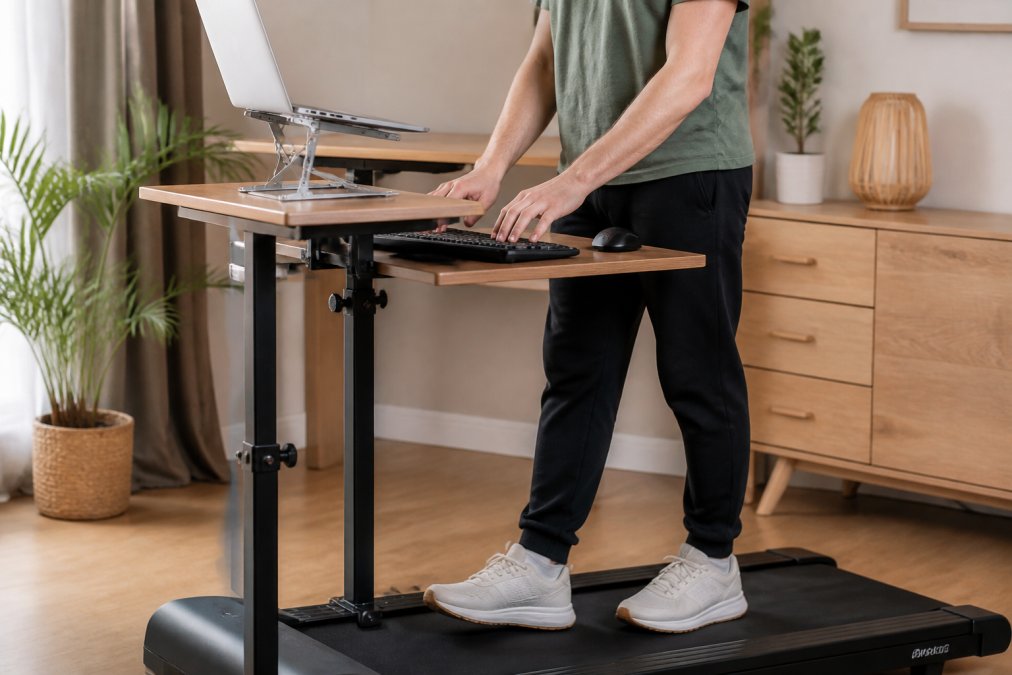
Look for these specifications:
- Height range: Minimum 10 inches of adjustability to reach eye level
- Stability: Wide base or clamp-mount design to prevent wobble
- Ventilation: Open design to prevent overheating
- Weight: Under 3 lbs to avoid bulk
Adjustable aluminum stands with folding arms work well for most laptop sizes. For apartment setups, a foldable treadmill paired with a height-adjustable stand and compact external keyboard creates a workstation packable in minutes. The Wild Bloom walking treadmill is designed for this: a quiet motor below 45 dB, anti-slip belt with shock absorption, and built-in transport wheels.

Mouse Precision and Cursor Control While Walking
Mouse precision is the hardest skill to transfer to a treadmill desk. Your hand moves with your body, your wrist lacks a stable anchor, and fine control requires the stillness that walking disrupts.
Hardware fixes:
- Use a mouse with adjustable DPI settings at moderate sensitivity
- Consider a trackball mouse, the device stays stationary while only your thumb moves the ball
- Use a larger mousepad for error margin
Software and OS Settings:
- Windows: Go to Settings > Bluetooth & Devices > Mouse > Additional Mouse Settings. Reduce pointer speed and enable "Enhance pointer precision" to smooth erratic movements from walking.
- macOS: Go to System Settings > Accessibility > Display > Pointer Size. Increase cursor size for easier tracking.
- Both platforms: Reduce scroll speed to prevent overshooting.
Common Challenges When You Walk While Typing (And How to Fix Them)
Posture and Alignment: Preventing Repetitive Strain
Keep your head neutral, shoulders relaxed, elbows at roughly 90 degrees with wrists neutral, and core lightly engaged. The most common failure is forward lean, instinctively leaning toward the screen. This compresses the lower back and strains the neck. If you catch yourself leaning, slow down; it signals your walking speed is too high for your adaptation level.
Start with 20-30 minute sessions and build gradually, treating physical adaptation like progressive training.
Noise, Calls, and the 45 dB Question
Standard treadmills at 3+ mph produce noise most microphones pick up. The relevant threshold is around 45 dB, roughly equivalent to a quiet library. At this level, directional microphones won't pick up motor sound during speech. The Wild Bloom treadmill operates below 45 dB by design.
Call management tips:
- Use a headset with close-proximity microphone
- Slow to lowest speed during calls
- Mute when not speaking
OS and Accessibility Settings That Help
- Increase display text size by 10-15% to reduce eye strain
- Enable dark mode to reduce glare fatigue
- Set longer screensaver and sleep timer intervals to avoid frequent interruptions
- Use keyboard shortcuts aggressively to reduce mouse dependency
Task switching is surprisingly challenging while walking. Building a keyboard-first navigation habit using Alt+Tab on Windows or Cmd+Tab on macOS reduces friction significantly.
Walking while working isn't a gimmick, it's a practical solution to the real cost of remote work: hours of unbroken sitting that accumulate over years. The setup investment is modest, the adaptation period is short, and daily step count gains are real. For professionals in compact home offices, the Wild Bloom portable under-desk treadmill offers a purpose-built solution: no assembly, a sub-45 dB motor, an anti-slip shock-absorbing belt, and a foldable design. Get started with the Wild Bloom portable under-desk treadmill and add meaningful movement to your workday.
Frequently Asked Questions
Can I use my laptop on a treadmill without losing typing accuracy?
Yes, most people regain close to their normal typing accuracy within one to two weeks of daily practice. The key is keeping your walking speed between 1 and 2 mph during typing tasks. At that steady-state pace, your gait is smooth enough that finger coordination stays consistent. Elevating your laptop to eye level on a proper stand also reduces the micro-corrections that throw off accuracy. Start with low-stakes tasks like email before moving to documents or code.
Does walking at your desk really help with health?
Walking at a treadmill desk breaks up the sedentary stretches that raise the risk of cardiovascular and metabolic issues over time. Even 60 to 90 minutes of light walking spread across a workday adds meaningful step counts without the intensity that would disrupt focus. The benefits build gradually: improved circulation, reduced lower-back tension, and better energy levels through the afternoon. The key word is consistency, short daily sessions beat occasional long ones.
How do I prevent motion sickness while walking and typing on a treadmill?
Motion sickness on a treadmill desk usually comes from a mismatch between visual focus and physical movement. Fix your monitor at true eye level so your gaze stays level rather than angled down. Keep walking speed at or below 2 mph. Avoid scrolling-heavy tasks in your first week. If symptoms persist, try a larger external monitor positioned further away, around 60 to 75 centimeters, which reduces the apparent motion of on-screen content relative to your field of view.
Is a quiet treadmill motor important if I'm on video calls all day?
Motor noise is a real concern on video calls. A treadmill rated below 45 dB operates at roughly the volume of a quiet library or soft background music, most directional microphones won't pick it up unless you're using a low-quality built-in mic at high sensitivity. For back-to-back calls, mute when you're not speaking, or pause the belt. A quiet motor below 45 dB, like the one in Wild Bloom's walking treadmill, is the minimum threshold worth targeting for a home office environment.
This article was written using GrandRanker