

Table of Contents
- Understanding Walking Treadmill Belt Stability for Typing
- Treadmill Belt Tension Adjustment Guide
- Belt Alignment and Tracking for Consistent Performance
- How to Use a Walking Pad on Carpet Without Damage
- Ergonomic Tips for Walking and Typing
- Troubleshooting Belt Slipping and Stability Issues
- Maintenance and Lubrication for Long-Term Stability
- Conclusion
Last Updated: August 20, 2026
Understanding Walking Treadmill Belt Stability for Typing
Walking treadmill belt stability for typing is the foundation of productive movement at your desk. Unlike traditional treadmills designed purely for cardio, a walking treadmill built for desk work must maintain consistent, predictable motion while you type, video call, and focus on tasks that demand precision. The belt needs to respond smoothly to your gait without slipping, bouncing, or creating vibration that throws off your accuracy.
Instability compounds quickly. A belt that drifts left forces micro-corrections in your posture. Vibration travels up through your legs into your hands, dropping typing accuracy and fracturing focus. Wild Bloom's approach to belt stability centers on three mechanical pillars: proper tension, precise alignment, and appropriate surface friction. Get these right, and you'll walk for hours without thinking about the machine beneath your feet.

Treadmill Belt Tension Adjustment Guide
Belt tension is the single most controllable variable in walking treadmill belt stability. Too loose, and the belt slips under load. Too tight, and you strain the motor and accelerate wear. The sweet spot is when the belt sits snug but moves freely, firm enough to grip your footfall, loose enough that you can manually slide it with moderate pressure.
Checking Your Current Belt Tension
Power off and unplug the treadmill completely. Place your hand on the belt at the midpoint between the rollers and press down with moderate force. The belt should deflect about half an inch. If it sags more than an inch, it's too loose. If it barely moves, it's over-tightened.
You can also perform a manual slide test. Grip the belt at the side and try to shift it laterally. It should resist movement but not feel locked. A properly tensioned belt will feel slightly springy rather than rigid or floppy.
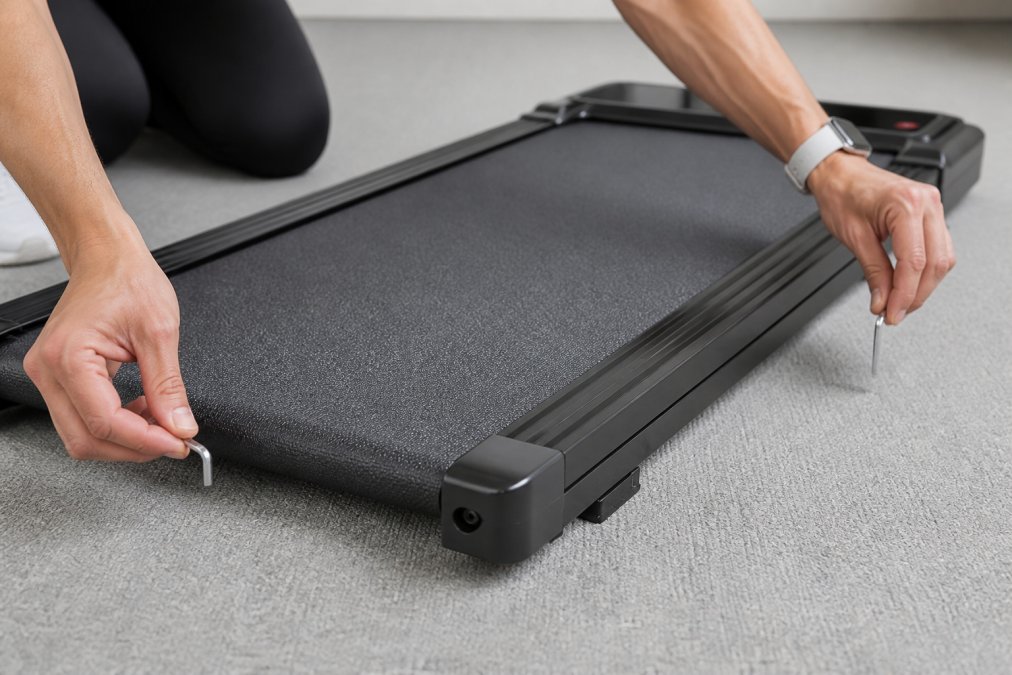
Manufacturing tolerances mean some units arrive slightly loose or tight. Checking tension takes two minutes and prevents weeks of frustration.
Step-by-Step Tensioning Process
Begin with the treadmill unplugged and cooled. Locate the tensioning bolts, typically one on each side of the rear roller. Use an allen key that fits snugly into the bolt head and turn clockwise in quarter-turn increments. After each quarter turn, perform the deflection test again.
The critical rule: adjust both sides equally. If you tighten one side more than the other, the belt will track off-center. Make a quarter turn on the left, then a quarter turn on the right, alternating sides. Most treadmills reach optimal tension after 2-4 full rotations per side.
After tensioning, walk on the treadmill at 1-2 mph for 30 seconds. The belt should feel stable and responsive without slapping sounds or visible vibration. Document your final tension setting for future reference. Over time, belts naturally stretch slightly, so you'll return to this adjustment every 3-6 months.
Belt Alignment and Tracking for Consistent Performance
A perfectly tensioned belt that's misaligned is nearly useless. Belt tracking determines whether the belt stays centered on the rollers or gradually drifts sideways until it rubs against the deck frame.
Misalignment starts subtly. The belt creeps a millimeter per stride, and after a few minutes you notice it pulling left. You unconsciously shift your weight right to compensate, your gait becomes asymmetrical, and your typing hand drifts off-center.
Check alignment by marking the belt edge with tape on both sides. Run the treadmill at 1 mph for 30 seconds and watch the tape. It should remain in the same position relative to the deck edge. If the tape moves toward one side, the belt is tracking off.
To correct tracking, locate the alignment bolts at each end of the rear roller. Loosen the bolt on the side the belt is drifting toward, allowing that roller to shift backward slightly, which pulls the belt back to center. Make small adjustments: a quarter turn at a time, testing after each one.
Always verify tension first, then address alignment. A belt that's too loose will track poorly no matter what you do with alignment bolts.
How to Use a Walking Pad on Carpet Without Damage
Carpet introduces friction that changes how a walking treadmill belt stability for typing operates. The treadmill must work harder to overcome carpet pile resistance, which can cause motor strain and belt slipping if not properly managed.
Measure your treadmill's footprint and purchase a non-slip mat that extends at least 6 inches beyond the treadmill's edges on all sides. Place the mat first, then position the treadmill on top. The mat's grip prevents the treadmill from creeping forward during use, a common issue on carpet that can damage fibers.
Reduce your initial walking speed by 0.2-0.5 mph when transitioning from hard flooring to carpet. The carpet's resistance means your legs experience different biomechanical feedback. Check belt tension weekly when using a treadmill on carpet, as increased friction accelerates belt stretch.
Never place a treadmill directly on carpet without a mat. The concentrated weight and friction create permanent indentations and damage carpet fibers.
Ergonomic Tips for Walking and Typing
Walking treadmill belt stability for typing means nothing if your body position undermines it. Ergonomics and belt mechanics work together.
Position your keyboard at elbow height when standing. Your elbows should bend at roughly 90 degrees. Keep your monitor at eye level using a monitor arm or riser. Looking down strains your neck and shifts your weight forward, disrupting your gait.
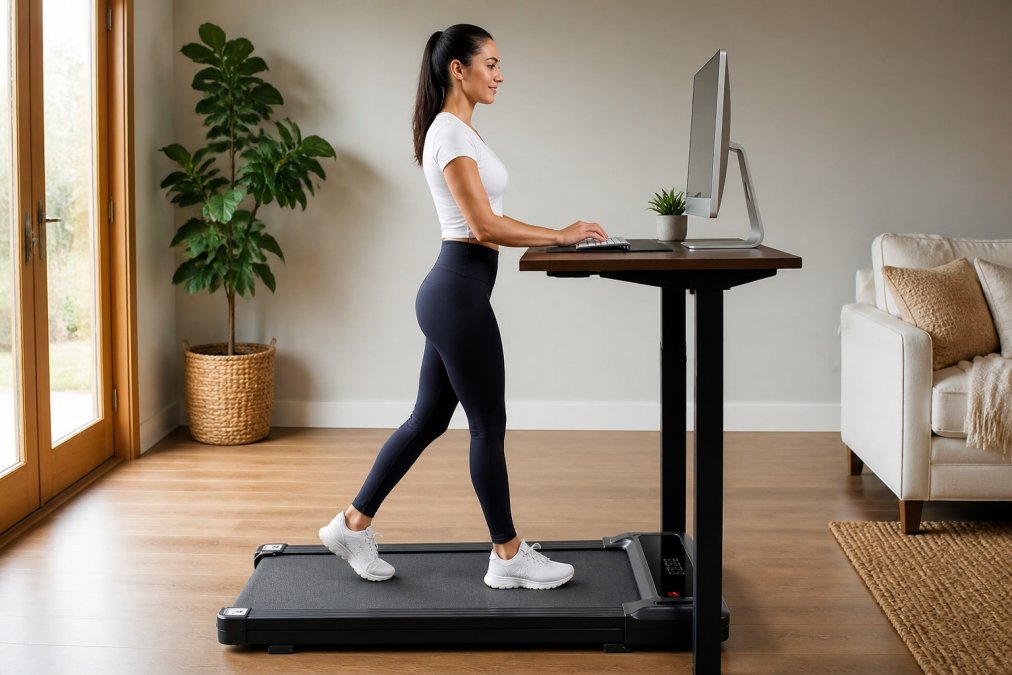
Maintain a natural walking cadence of 2-3 mph. This pace allows you to type without disruption and maintain balance. Walking faster than 3 mph makes typing difficult and increases fall risk.
Your feet should land in a neutral position, not turned inward or outward. Land heel-first, roll through the arch, and push off from your toes. Engage your core muscles lightly to stabilize your spine and keep your weight centered over the belt.
Take breaks every 45-60 minutes. Stepping off the treadmill for 5-10 minutes every hour prevents fatigue-related form breakdown, when balance issues become noticeable.
Troubleshooting Belt Slipping and Stability Issues
Belt slipping is the most common complaint and is almost always fixable through tension or alignment adjustment.
If your belt slips when you first step on it, tension is too loose. Tighten using the process described earlier and test at 1 mph. If slipping continues, check alignment, as a misaligned belt can slip even when properly tensioned.
If the belt slips only during faster walking (above 3 mph), the motor can't generate enough rotational force to overcome the belt's friction and your body weight simultaneously. Reduce your walking speed or consult the manufacturer.
Vibration during walking often indicates misalignment rather than tension problems. Listen for a rhythmic thumping sound. If you hear it, check alignment before adjusting tension.
Slipping that occurs after 10+ minutes usually points to belt stretch. As the belt warms, it expands slightly. Tighten the belt when cold, then verify tension again after a 15-minute warm-up session.
If the belt creeps forward, your equipment mat is insufficient or missing. Stop using the treadmill until you've placed a proper non-slip mat underneath.
Maintenance and Lubrication for Long-Term Stability
Preventative maintenance extends belt life and keeps walking treadmill belt stability for typing consistent over months and years.
Check belt tension and alignment monthly. This becomes a 5-minute routine that catches problems before they become serious.
Lubricate the belt sparingly with silicone-based lubricant designed for fitness equipment. Check your manual for specific guidance. Never use oil-based lubricants or WD-40, as these can damage the belt material and attract dust.
Inspect the belt visually every 3 months for fraying edges, cracks, or peeling surface material. Minor surface wear is normal. Significant damage requires belt replacement.
Keep the treadmill's motor and drive system clean by removing dust from vents with a dry cloth or soft brush. Store your treadmill in a climate-controlled space if possible. If it sits unused for several weeks, check tension before resuming use.
The Wild Bloom portable under desk treadmill is engineered with a shock-absorbing belt and anti-slip surface that maintains stability across extended work sessions. Its no-assembly design means you can verify belt tension and alignment within minutes of unboxing.
Conclusion
Walking treadmill belt stability for typing isn't about perfection, it's about predictability. Your belt doesn't need to be flawless; it needs to respond consistently to your footfalls and maintain alignment throughout your workday. When tension is correct, alignment is true, and your ergonomic setup supports your natural gait, the machine becomes invisible.
The three fundamentals, tension, alignment, and ergonomics, compound when done together. Adjusting tension alone helps. Adding proper alignment helps more. But pairing both with an ergonomic desk setup creates the stability that makes walking and typing feel effortless.
Frequently Asked Questions
Why does my treadmill belt slip when I walk?
Belt slipping typically results from insufficient belt tension or misalignment. Check that both sides of the belt are equally tensioned using an allen key on the tensioning bolts at the rear of the treadmill. Slipping can also occur if the belt has stretched over time or if the deck friction is reduced due to lack of lubrication. Ensure your walking speed matches the belt's grip capacity, excessive speed relative to belt tension causes slip-like perturbations. If slipping persists after tensioning, the belt may need replacement.
How do I adjust walking treadmill belt tension?
Most walking treadmills use allen key tensioning bolts located at the rear corners of the belt. Loosen both bolts slightly, then tighten them evenly in quarter-turn increments. The belt should be snug enough that it doesn't slip under your weight but loose enough to rotate freely by hand. Check tension by pressing down on the belt midway between the rollers, it should give about half an inch. Adjust one side at a time if the belt drifts, then recheck alignment. Proper tension prevents mechanical wear and maintains stability for typing.
Can I use a walking pad on carpet without damaging it?
Yes, but use protective measures. Place a non-slip mat or rubber underlay beneath the walking treadmill to prevent it from shifting during use and to protect carpet fibers from compression. Ensure the carpet is clean and dry to reduce friction that can stress the belt and motor. Avoid thick, plush carpets that can cause the treadmill to sink unevenly, which compromises belt alignment. Check the treadmill's feet regularly for any carpet fibers caught underneath. A protective barrier extends both your carpet's life and your treadmill's performance.
What's the best walking speed for typing stability?
Most professionals maintain 1.5 to 2.5 mph when typing on a walking treadmill. This speed allows you to maintain typing accuracy and user balance without excessive perturbations or vibration. Slower speeds (under 1.5 mph) reduce calorie burn, while faster speeds (above 3 mph) increase instability and typing errors. Your ideal speed depends on your walking cadence and desk setup. Start at 1.5 mph and gradually increase as your body adapts. A properly tensioned belt with good surface grip makes it easier to maintain stability at your preferred speed.
Start with Wild Bloom's portable under desk treadmill and implement the belt tension and alignment practices covered here. Our anti-slip belt with shock absorption keeps you stable through back-to-back calls and deep work sessions, while the quiet motor below 45 dB means your colleagues and neighbors stay undisturbed. Get started with Wild Bloom and transform your workspace into a healthier, more active environment where movement and productivity work together.
This article was written using GrandRanker