

Table of Contents
- Measure Your Floor Space and Check Weight Limits
- Set an Ergonomic Standing Desk Height for Walking
- Position Your Monitor Arm and Keyboard for Stability
- Plan Your Walking Pad Setup for Easy Transitions
- Walking Pad Noise Reduction Tips for Shared Spaces
- Smart Under-Desk Treadmill Storage Ideas for Tight Homes
- Manage Cables and Power Without Clutter
- Conclusion
- Frequently Asked Questions
Last Updated: September 6, 2026
A walking desk setup places an under-desk treadmill beneath a standing desk so you can walk at a low speed while working. It breaks up the sedentary rhythm of a work-from-home day, but it presents a real spatial problem when your office is a corner of a bedroom or a nook off the kitchen. This guide from Wild Bloom walks through floor space, desk height, monitor placement, noise, and storage so you can build a stable walking workstation without sacrificing your apartment's livability.
A compact walking pad is designed for exactly this constraint. Unlike a full treadmill desk, a foldable walking pad tucks away when you need the floor back. Below, we cover the decisions that determine whether your setup feels seamless or cramped, starting with the measurements that dictate everything else.

Measure Your Floor Space and Check Weight Limits
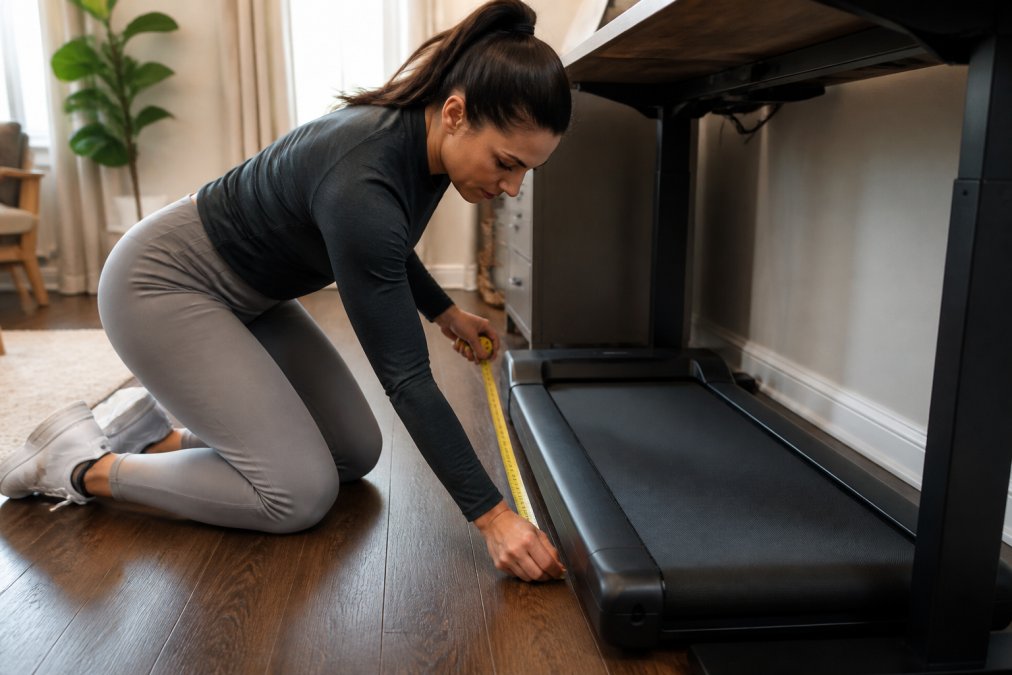
Start by measuring the footprint you can dedicate to the walking pad, then confirm the floor can support the combined weight of you, the unit, and your desk. A typical compact walking pad requires a rectangle of roughly 48 by 20 inches, plus about 24 inches of clearance behind it so you can step on and off safely (the CDC).
Use painter's tape to mark the walking pad's footprint and live with that outline for a day. This reveals whether the space still allows you to push your chair back, open a drawer, or walk past to the door. While you are down there, check what sits beneath the tape. Many apartments have wood or laminate floors over joists, and while a walking pad's weight is distributed across its frame, you should verify the floor is level and free of soft spots.
The weight limit matters for safety and motor longevity. Most under-desk treadmills support between 220 and 300 pounds, and exceeding that rating strains the motor and destabilizes your stride (osha.gov). Check the manufacturer's spec for your unit, and remember the limit includes your body weight plus anything you are holding.
Set an Ergonomic Standing Desk Height for Walking
Your ergonomic standing desk height for walking differs from your standing desk height for typing. When you walk, your body rises and falls slightly with each step, so the desk surface needs to sit about one to two inches higher than your standard standing elbow height to prevent hunching.
A simple way to find the right height: stand tall with your arms relaxed at your sides and bend your elbows to 90 degrees. Your hands should rest just below the desk surface. When you step onto the walking pad, your body will naturally sit a touch taller, so test the height while actually walking at your target speed of 1.5 to 2 miles per hour.
Adjustable height desks make this easy, but if you have a fixed-height standing desk, you can add a sturdy platform under the walking pad to raise your stance. This is a common workaround, though it raises the step-up height, so keep the platform low and wide for stability.
Position Your Monitor Arm and Keyboard for Stability
The real test of a walking desk setup is whether you can type accurately and read your screen without bobbing. A monitor arm is the single most important accessory because it decouples your screen from the desk's movement and lets you lock the display at true eye level.
Mount the monitor arm so the screen sits at or slightly below your eye line, about an arm's length away. The top third of the monitor should be at eye level, which keeps your neck neutral as you walk. A dual monitor arm is worth the investment if you use two screens, since it lets you align both displays to the same height and angle.
Your keyboard and mouse need a stable surface that moves with you, not against you. A full-size desk gives your forearms a place to rest, but if you are working with a narrow standing desk, use a compact keyboard tray that keeps your wrists straight. The goal is to keep your shoulders relaxed and your elbows at roughly 90 degrees while your legs move freely beneath the desk.
Plan Your Walking Pad Setup for Easy Transitions
A walking desk only works if the transition between sitting and walking takes under thirty seconds. If moving the chair, unfolding the pad, and plugging it in feels like a chore, you will default to sitting by Tuesday. The setup should live in a permanent or semi-permanent position that requires minimal rearrangement.
Choose a Layout That Fits Your Room's Shape
The most common mistake in a small space is placing the desk against the longest wall and the walking pad directly in front of it, which forces you to shuffle around furniture every time you switch modes. Instead, match the layout to your room's geometry:
- Narrow room (under 8 feet wide): Place the desk against the short wall and the walking pad perpendicular to it, so you walk along the room's length. This gives you a straight walking path without bumping into a bed or bookshelf.
- Square room (8 to 10 feet per side): Position the desk in a corner with the walking pad angled at 45 degrees. This creates a triangular walking zone that maximizes the usable floor area and lets you step on from the side.
- L-shaped or partitioned room: Tuck the walking pad under a low windowsill or beside a room divider. The visual boundary helps you maintain a straight line while walking and keeps the pad out of your peripheral vision during calls.
Mark the Walking Path and Entry Point
Use painter's tape to outline the walking pad's footprint plus a 6-inch buffer on each side. Then mark a clear entry point on the side where you will step on. Side entry means you do not have to shuffle around a desk leg or knock your chair out of the way. If your space forces front entry, leave a clear path and store the chair pushed fully under the desk when you walk.
Test the transition five times in a row. If you find yourself stepping over a cable, rotating your hips to squeeze past a desk leg, or reaching awkwardly for the remote, adjust the layout before you commit. A good transition should feel like stepping onto a scale, not navigating an obstacle course.
Build a 30-Second Transition Routine
A reliable routine prevents the friction that kills the habit. Here is a sequence that works in most small offices:
- Push your chair fully under the desk, this clears the side entry path.
- Step onto the pad from the side, keep one hand on the desk for balance as you step on.
- Clip the safety magnet to your waistband, this is non-negotiable; it stops the belt if you step too far back.
- Press the remote's start button, keep the remote on a small adhesive hook at the desk's edge so you never hunt for it mid-task.
- Begin at 0.8 to 1.0 miles per hour, hold the desk edge for the first 10 seconds until your gait steadies, then increase to a comfortable 1.5 to 2.0 miles per hour.
To transition back to sitting, reverse the steps: slow the belt to its minimum speed, step off from the side, and pull your chair out. The entire sequence should take less than 30 seconds once you have practiced it a few times.
Use Visual Cues to Reinforce the Routine
Place a small sticky note on your monitor at eye level that reads "Walk first" or set a recurring calendar reminder for 10:00 AM and 2:00 PM. These cues interrupt the seated default and prompt you to run the 30-second routine. Many practitioners find that pairing the transition with a natural break, like finishing an email or ending a call, makes the habit stick more reliably than a timer.
Plan for the 'Almost' Moments
A small space often means your walking pad shares the room with a bed, a sofa, or a pet bed. If you walk while watching a video on your phone, position the phone on a small stand at eye level rather than holding it. If you need to step off quickly to grab a package at the door, keep the remote within arm's reach and use the safety clip, it will stop the belt automatically if you step back too far.
A common pattern is to leave the walking pad out for a few days, then fold it away when you need the floor for a yoga session or a guest. The transition routine works best when the pad stays in place, so reserve folding for days when you genuinely need the space, not as a daily habit.
Walking Pad Noise Reduction Tips for Shared Spaces
Walking pad noise reduction tips matter most when you share walls, floors, or a microphone with others. A quiet motor is necessary but not sufficient; the sound of your footsteps and the vibration through the floor are what neighbors actually hear.
A high-density foam mat under the walking pad absorbs impact and dampens vibration. Look for a mat that is at least a quarter-inch thick and slightly larger than the pad's footprint. This single addition does more for noise reduction than any other measure, and it protects your floor from scuffs.
If you take back-to-back video calls, position the walking pad away from the desk's microphone and use a headset with a noise gate. Many practitioners find that walking at a slow pace below 1.5 miles per hour is inaudible on a call when the microphone is on a boom arm near your mouth rather than on the desk surface.
For apartments with downstairs neighbors, schedule walking sessions during daytime hours and avoid the early morning and late evening. A walking pad with a motor rated below 45 decibels, like the portable under desk treadmill from Wild Bloom, operates at roughly the volume of a quiet conversation, which is a fraction of the noise a full-size treadmill produces.
Smart Under-Desk Treadmill Storage Ideas for Tight Homes
Smart under-desk treadmill storage ideas start with choosing a unit that folds. A foldable walking pad with transport wheels can stand upright in a closet, behind a door, or beside a bookshelf, reclaiming your floor space in under a minute.
Measure your storage spot before you buy. A folded walking pad typically stands about 50 inches tall, 22 inches wide, and 6 to 8 inches deep. Check that your closet or corner accommodates those dimensions, and confirm you can roll the unit there without scraping walls or navigating tight corners.
If you walk daily, consider leaving the pad out and storing only the chair. This keeps the transition friction low and the walking habit intact. If you walk a few times per week, store the pad upright and pull it out only on walking days.
The Wild Bloom portable under desk treadmill fits this profile: it arrives fully assembled, folds for vertical storage, and rolls on built-in transport wheels. It offers a low-friction entry point for professionals who want the health benefits of walking while working without dedicating permanent floor space to equipment.
Manage Cables and Power Without Clutter
Cable management makes or breaks a small-space walking desk. A loose power cord from the treadmill is a trip hazard, and an overloaded outlet is a fire risk. Route the walking pad's power cord along the baseboard and secure it with adhesive cable clips so it never crosses a walking path.
Understand Your Circuit's Real Capacity
A standard residential outlet in the United States is on a 15-amp circuit, which means it can safely deliver about 1,800 watts continuously (120 volts × 15 amps) (energy.gov). However, the National Electrical Code (NEC) recommends loading a circuit to no more than 80% of its rating for continuous use, which brings the safe working limit to about 1,440 watts per circuit.
A typical under-desk treadmill draws between 300 and 700 watts during normal walking, with a startup spike that can briefly reach 1,000 watts or more. Before you plug anything in, identify which outlets share the same circuit breaker. In many apartments, outlets in the same room, or even adjacent rooms, are wired to a single breaker. Flip the breaker off and on to map which outlets lose power, then total the wattage of everything you plan to run simultaneously.
Calculate Your Load Before Plugging In
Here is a quick reference for typical wattage draws in a home office setup:
- Under-desk treadmill (walking): 300-700 watts
- Laptop charger: 45-100 watts
- External monitor (24-27 inches): 30-60 watts
- LED desk lamp: 5-15 watts
- USB hub and phone charger: 10-20 watts
- Desktop computer tower: 200-500 watts
Add these together. If your total exceeds 1,440 watts, you need to spread the load across two separate circuits. For example, plug the treadmill into a wall outlet on one circuit and run your desk electronics from an outlet on a different circuit. This is especially important in older buildings where a single 15-amp breaker may serve an entire room.
Use a Power Strip With a Built-In Breaker
For your desk electronics, choose a power strip with a built-in circuit breaker and a surge protector rated for at least 1,800 joules. Look for a strip with a 6-foot cord and a right-angle plug so it sits flush against the wall and does not block the outlet's second socket. Mount the strip vertically on the underside of your desk with heavy-duty adhesive strips so it stays off the floor and out of the walking pad's path.
Route Cords Away From the Walking Zone
Use a cable tray under the desk to gather monitor, keyboard, and charging cables into a single bundle. This keeps cords off the floor where the walking pad's wheels could catch them. A vertical cable sleeve along the desk leg completes the tidy look and prevents dust buildup in hard-to-reach corners.
For the treadmill's power cord, route it along the baseboard and secure it with adhesive cable clips every 12 to 18 inches. If the cord must cross a walkway, use a floor cord cover, a rubber or plastic channel that lies flat and protects the cord from being stepped on. Never run the cord under a rug or mat; the cord can overheat when covered, and the mat's weight can damage the insulation over time.
Test Your Setup for Stability
After everything is plugged in, turn on the treadmill and all your desk electronics simultaneously. Walk at your target speed for 5 minutes. If the lights in the room dim, the power strip feels warm to the touch, or the breaker trips, you are overloading the circuit. Move the treadmill to a different outlet on a separate circuit and retest.
Plan for Power Outages and Surges
A surge protector does not protect against a complete power outage. If the power goes out while you are walking, the treadmill will stop abruptly. Keep the safety clip attached at all times so you do not stumble when the belt halts. After an outage, check that the treadmill's power switch is in the off position before restoring power, then turn it on and resume at a low speed.
For an added layer of protection, consider a UPS (uninterruptible power supply) for your computer and monitor. A UPS rated at 600-900 VA provides enough backup time to save your work and shut down safely during an outage. This is a worthwhile investment if you live in an area prone to brownouts or if your work involves unsaved documents.
Conclusion
Setting up a walking desk in a small space comes down to measuring honestly, positioning your screen and keyboard for stability, and choosing equipment that stores itself. The transition between sitting and walking should take seconds, not a full rearrangement of your room.
Wild Bloom makes this practical with a portable under desk treadmill that requires no assembly, folds for storage, and operates quietly enough for shared spaces. Its anti-slip belt and shock absorption keep your stride stable while you type, and the built-in wheels mean the unit moves from desk to closet without lifting. Get started with Wild Bloom and turn your cramped corner into an active workstation that adds steps to your day without adding clutter.
Frequently Asked Questions
How much space do you need for a walking desk setup?
You need roughly 3 feet of depth for the walking pad and about 4 feet of width to walk comfortably. Add 2 feet behind the pad for stepping off safely. A 6 by 4 foot area in a corner usually works. Measure your actual walking pad footprint first, then check that your desk width fits the space without blocking door swings or drawers.
What is the best desk setup for a walking pad?
The best setup uses an adjustable height desk so your elbows stay at 90 degrees while walking. Your monitor should sit at eye level on an arm to prevent bobbing. Place the walking pad centered under your desk with a 2-inch gap behind you. A standing mat under the pad reduces vibration and keeps the belt from slipping on hard floors.
How do you store a walking treadmill in a small apartment?
Look for a foldable walking pad with transport wheels. Fold the deck vertically and roll it into a closet gap, under a bed, or beside a wardrobe. Keep the remote and power cord in a small bin on a floating shelf so you don't lose them. A vertical storage rack can also hold the pad upright against a wall without taking up floor space.
How do you keep a walking desk setup quiet for meetings?
Place a thick rubber floor mat under the walking pad to absorb vibration. Walk at a slower speed below 2 mph during calls. Position your microphone away from the motor and use a noise gate in your conferencing app. The Wild Bloom motor runs below 45 dB, which is quieter than a normal conversation, so clients typically won't hear it.